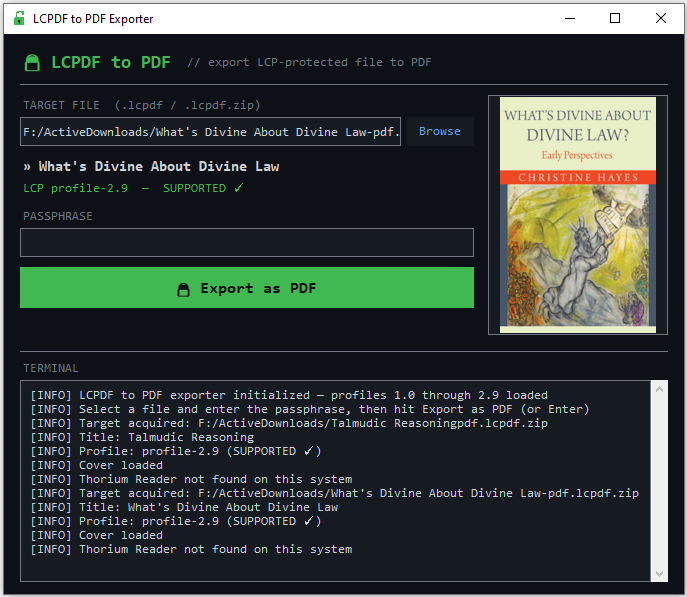
A small Python tool for exporting Readium LCP–protected PDFs back to plain PDFs, using the passphrase that was sold to you alongside the book. v1.11 is the first version I’m comfortable pointing people at.
If you’ve ever bought a protected PDF, received a passphrase by email, and then found yourself stuck inside one specific reader app — LCPDF Exporter exists for exactly that moment. It decrypts the file with your key and writes out a standard PDF next to the original. No server round-trips, no account, no telemetry. One Python file with a small GUI.
I built it because I wanted a book I paid for to behave like a book I paid for: portable, archivable, readable on the device of my choice. The passphrase is mine. The content is mine. The file should be too.
What ships in v1.11
Because this is the first public release, the changelog is the feature list. Here is everything the tool does today:
| Dark GUI | Tkinter-based, intentionally minimal. Browse → passphrase → export. No menus to learn. |
|---|---|
| LCP profile coverage | basic, profile-1.0, and the whole profile-2.0–2.9 range. Unknown profiles fall back to a best-effort pass across every known transform. |
| Cover preview | Shows the book’s cover before decrypt, via Pillow. Optional dependency — the tool still works without it. |
| Metadata readout | Title and detected encryption profile, visible at a glance before you commit. |
| Thorium auto-fill | If you’ve opened the book in Thorium Reader, the passphrase is picked up automatically. No hunting through old emails. |
| Live log panel | Everything the tool is doing — profile detection, transforms applied, output path — streamed to a visible log. |
| Zero config | One Python file, two dependencies, no build step, no config directory. Clone and run. |
Getting it running
Requires Python 3.8 or newer. pycryptodome is required;
Pillow is optional (only needed for cover previews).
git clone https://github.com/Chaiavi/lcpdf_exporter.git
cd lcpdf_exporter

python -m venv .venv
source .venv/bin/activate         # macOS / Linux
# .venv\Scripts\activate          # Windows

pip install -r requirements.txt
python lcpdf_exporter.py
A note on the version number
The jump from v1.0 straight to v1.11 on the same day looks strange, so here’s the honest story: three tags went up within a few hours on April 17 while I sorted out packaging and naming. v1.11 is the one that actually works the way I intended.
| Tag | Time | Purpose |
|---|---|---|
v1.0 | First tag — early naming iteration | |
v1.1 | Release metadata update | |
v1.11 | Recommended — the one to grab |
Scope, and what comes next
The scope of the tool is deliberately narrow: decrypt a file you own, using a key you were legitimately given. That’s the whole product, and that’s how I’d like to keep it.
If you run into an unusual LCP variant that doesn’t decrypt cleanly, or if you think of something small that would genuinely make the tool better without turning it into something else, open an issue. The repo is open, and I read every one.