LCPDF Exporter
The books you paid for,
in the format you choose.
A clean, dark-themed desktop tool that decrypts Readium LCP–protected
.lcpdf files back to standard PDFs — using the
passphrase that was sold to you alongside the book.
Why this exists
You buy a book. You receive a .lcpdf.
It opens in one app, on the devices they approve,
under terms they can revise at will.
Readium LCP is a legitimate digital-rights format used by many ebook retailers. When you purchase a protected PDF, you are given a personal passphrase alongside the file. That passphrase is yours — it is the key to the content you paid for.
LCPDF Exporter uses that key the way a key is meant to be used: to open a door you already own.
No servers. No account. No telemetry. A single Python script with a small, deliberate GUI — sitting on your desktop, doing one job well.
Built for people who
actually read.
Six small decisions, each one chosen to stay out of your way.
A clean, dark GUI
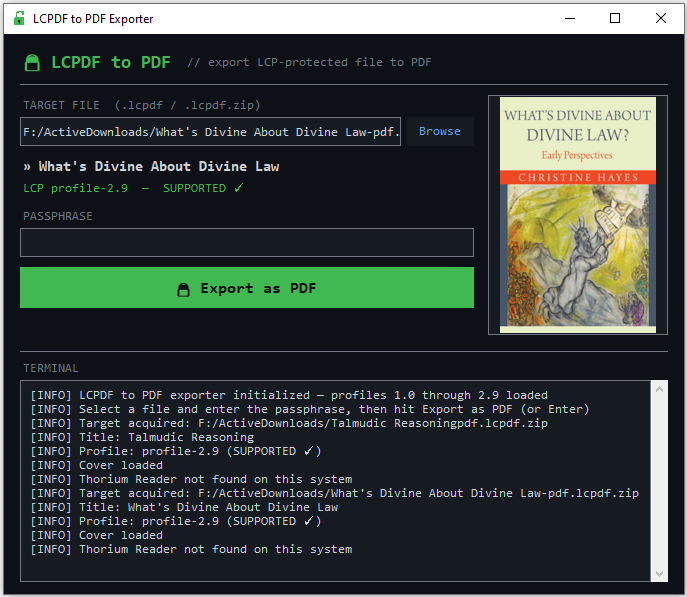
Tkinter-based, intentionally minimal. Pick a file, enter a passphrase, export. There is nothing else to learn.
Every LCP profile
Supports basic, profile-1.0, and the entire
2.0–2.9 range. Unknown profiles fall back to a
best-effort pass across every known transform.
Cover & metadata preview
See the cover, title, and detected encryption profile before you commit to a decrypt. No surprises, no guesswork.
Thorium auto-fill
If you have already opened the book in Thorium Reader, the passphrase is picked up automatically. No hunting through old emails.
Live log panel
A transparent stream of everything the tool is doing — profile detection, transforms applied, output path. Nothing is hidden.
Zero configuration
One Python file. A requirements.txt with two entries.
No daemons, no config directories, no build step. Clone and run.
Three steps.
That’s the UX.
-
01
Browse
Select your
.lcpdfor.lcpdf.zipfile. The cover and title appear; the encryption profile is detected. -
02
Enter your passphrase
The one your distributor gave you. If Thorium Reader has opened the book before, the field is already filled.
-
03
Export
A clean, standard PDF is written next to the original. Open it on any reader, on any device, for as long as the file exists.
Up and running
in under a minute.
Requires Python 3.8 or newer. Two dependencies:
pycryptodome for the crypto and — optionally —
Pillow for the cover preview.
Supported LCP profiles
basic-profile | ✓ supported |
profile-1.0 | ✓ supported |
profile-2.0 → 2.9 | ✓ supported |
| anything else | best-effort fallback |
# clone the repo
git clone https://github.com/Chaiavi/lcpdf_exporter.git
cd lcpdf_exporter

# virtual env (recommended)
python -m venv .venv
source .venv/bin/activate          # macOS / Linux
# .venv\Scripts\activate          # Windows

# install dependencies & launch
pip install -r requirements.txt
python lcpdf_exporter.py
A note on what this tool is.
LCPDF Exporter does not break, bypass, or circumvent any security. It operates on files you legally purchased, using a key that was legitimately sold to you alongside the content. It exists so that a book you bought behaves like a book you bought — readable on devices you own, with software you trust, for as long as the file exists.
Use it for personal, legal reading. Respect your local laws and your distributor’s terms. You are responsible for your use.